
Skip to content
Park Tracking

Plan it. Track it. Relive it.

Build your Disneyland day stop by stop, with live waits, ride lengths and walking times worked out for you. Or just show up and tap Start Timer at each ride.

Your first plan is on us: pick a sample plan, or start a blank one with up to five stops.

Two ways to use it

Plan every stop, or just show up.

You can mix them. Either way, you end up with a record of what you rode and how long you actually waited compared with the sign.

Plan ahead

Build your day stop by stop, and we work out the waits and walking times. Plan as far ahead as you like: planning never uses up a day.

Just show up

Tap Start Timer at each ride and it logs itself to that day. Nothing to set up.
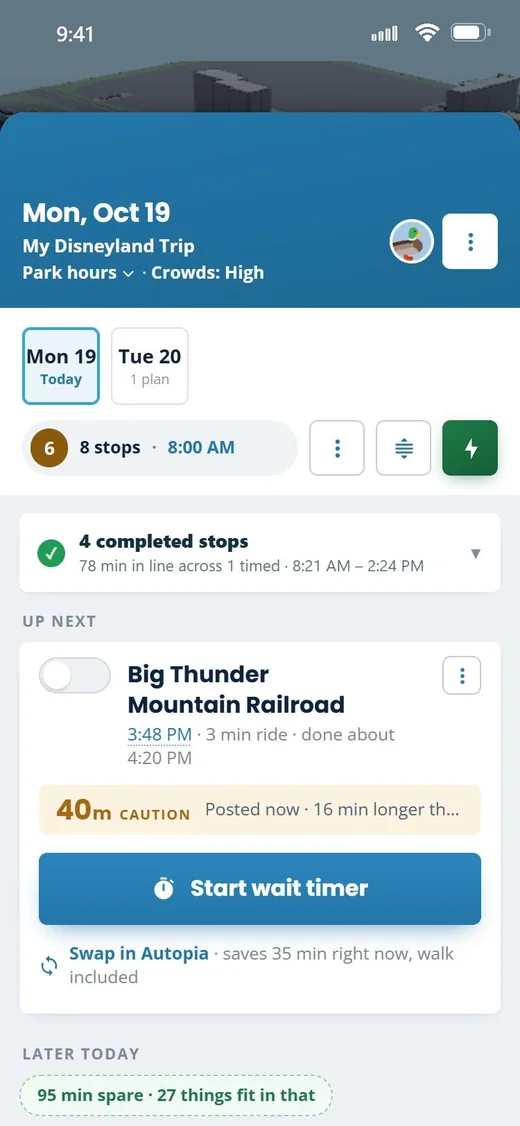
Park Tracking: a planned park day, stop by stop

Build your whole day.

Plan a park day ride by ride, then let the map keep up with you. Add attractions, shows, and places to eat, and watch it all sit on the same 3D map the rest of the app runs on.

Move a stop and the day re-plans itself: drag it to a new spot or swap in something nearby, and everything after it updates to match.

Start your free plan
In the park

Built for real park days.

Plans change the minute you're through the gates. Yours keeps up.

David's plans

Start from the routes and ride orders David has already tested in the park himself, or build your own.

The quickest route

Ask for the quickest route and let it reorder the day for you.

Pin your times

Have a Lightning Lane return or a dining reservation? Pin that time and the rest of the day works around it.

Bring the family

Set your party size and the height everyone in your group can ride. We'll only suggest rides you can all go on, and show how you'll sit on each one, like 2 + 2.

Share a plan

Invite anyone to the whole trip, or share a single plan. Choose whether each person can view or edit. Viewers just need a free account, so your kids can follow along on their own phones.

Waits that switch on in the park

Before the day, your plan shows when you'll reach each stop and the wait we expect then. Live waits and timers switch on once you're in the park.

Relive every park day.

Every day you track turns into something you'll want to look back on. Nothing disappears, even if you cancel.

Day in Review

How much time you saved, your best call of the day (what the sign posted against what you actually waited), your rides and your stats.

Trip in Review

The whole trip, day by day, at the end.

Your calendar

Every day you track goes on your calendar.

Year in Review

Every January, covering the year before.

It works just like the parks

Passholder, or just visiting?

If you're going two or more days in a month, the subscription costs less.

Park Tracking

Like being a passholder.

Every park day is covered, month to month or the whole year.

See Park Tracking plans
Trip Days

Like buying park tickets.

Get just the days you'll be in the park, with a few extra days of wiggle room to use them. A one-time purchase with nothing to cancel.

Buy Trip Days

Questions

Park Tracking

What do I get?
There are two ways to use it, and you can mix them. You can plan ahead by building your day stop by stop, and we work out the waits and walking times. Or you can just show up and tap Start Timer at each ride. Either way, you end up with a record of what you rode and how long you actually waited compared with the sign.
Can I try it first?
Yes. Your first plan is on us. Pick a sample plan, or start from a blank one and add up to five stops, then run a real park day with it. David's own plans unlock when you buy days or subscribe.
Should I buy days or subscribe?
It works just like the parks. Trip Days are like tickets: $10 a day, as many days as your trip needs, and nothing to cancel. Park Tracking is like being a passholder: $15 a month or $144 a year, and every park day is covered. If you're going two or more days in a month, the subscription costs less.
Can I change the plan once I'm in the park?
Yes. Drag a stop to a new spot, swap in something nearby, or ask for the quickest route. Everything after it updates to match. If you have a Lightning Lane return or a dining reservation, pin that time and the rest of the day works around it.
What's in a Day in Review?
It's built from your active plan for the day. It shows how much time you saved and your best call of the day, meaning what the sign posted against what you actually waited. It also shows your rides and your stats. At the end of a trip you also get a Trip in Review. Every day you track goes on your calendar, and it all adds up to your Year in Review.
Can I plan with other people?
Yes. Invite anyone to the trip and they come along for the whole thing. You can also share a single plan and choose whether each person can view it or edit it. Viewers just need a free account, so your kids can follow along on their own phones and see what's done and what's next. Anyone who edits a plan needs Park Tracking or Trip Days for that day. You can change someone's access or remove them whenever you like.
Why can't I start a timer or see live waits yet?
Tracking and live waits switch on the day itself, once you're in the park. Before then, your plan shows the times you'll reach each stop and the wait we expect when you get there. That way nobody activates a day by accident.
How is this different from Park Science?
Park Science is about the rides: wait patterns, the best times to go, and what the queue actually looks like. Park Tracking is about your own days: planning them, timing them and keeping them. They're separate subscriptions, and the bundle is both.
When do I get my Year in Review?
Every January, covering the previous calendar year.
How do I cancel?
Tap Cancel my subscription under Subscriptions in your account. It stays on until the end of the period you've paid for and then stops. If you change your mind before then, tap Keep my subscription to undo it.
What happens to my days if I cancel?
Nothing disappears. Every logged day and every trip you planned stays readable for good. Planning and tracking pick up again the moment you resubscribe.

Trip Days

Should I buy days or subscribe?
It works just like the parks. Trip Days are like tickets: $10 a day, as many days as your trip needs, and nothing to cancel. Park Tracking is like being a passholder: $15 a month or $144 a year, and every park day is covered. If you're going two or more days in a month, the subscription costs less.
When do my days start?
When you're in the park and you check off your first stop or start your first timer. That activates your first day.
How long do I have to use my days?
The number of days you bought plus 4, counting your first day. Buy 3 days and you have 7 days to use them. A 1-day purchase covers just that one day.
I bought trip days. Can they count toward a subscription?
Yes, if you haven't started your trip yet. Each unused day takes $10 off your first year of Park Tracking when you subscribe yearly. Once your first day activates, those days can't be turned into credit. It's a discount on the yearly price only, not a refund.
How far ahead can I plan?
As far as you like. You can start planning the moment you buy, even a year out. Planning doesn't use up any days, and timers and check-offs only switch on when you're in the park on that day.
Do trip days include Park Science?
No. Trip Days are Park Tracking for one trip. Park Science is its own subscription.
Do I keep everything afterwards?
Yes. Every day you log stays readable for good, including your Day in Review and the Trip in Review at the end.

Your first plan is on us.

Pick a sample plan or start a blank one, then run a real park day with it. Be safe, and be kind to one another.

Which lines really run short? See Park Science